Understanding Windows Defender Security Warnings: Legitimate Alert or False Positive?
If you think cyber threats are slowing down, think again. Cyberattacks are more active—and more deceptive—than ever. Among the most common tactics today is phishing, a threat that affected 83% of companies in 2021, with more than half resulting in data breaches.
These scams often hide in plain sight. A casual email, a fake promo link, or even a seemingly harmless security alert can be enough to trick users. One of the most notorious examples is the Windows Defender Security Warning—a convincing browser-based scam that preys on fear.

What Is the Windows Defender Security Warning Scam?
This phishing scheme displays a fake pop-up alert that claims your computer is infected with a virus or Trojan. The message looks authentic, complete with Microsoft logos and technical jargon, warning you of a “critical threat.”
Scammers design these alerts to look real enough to cause panic. They often include a phone number for “Microsoft support,” but the line actually connects you to the attackers. Once they have your attention, they’ll instruct you to install “repair software”—granting them remote access to your device. From there, they can:
-
Steal your personal or financial data.
-
Trick you into paying for fake services.
-
Install additional malware to spy on your system.
Sometimes, these alerts even redirect you to spoofed Microsoft websites. Clicking on links that say “Go to Safety Mode” or “Turn on Protection” often leads to malware downloads instead of safety.
How Do These Fake Security Warnings Appear?
Cybercriminals have several tricks for spreading the Windows Defender Security Warning. Here are the most common entry points:
1. Installing Cracked or Unlicensed Programs
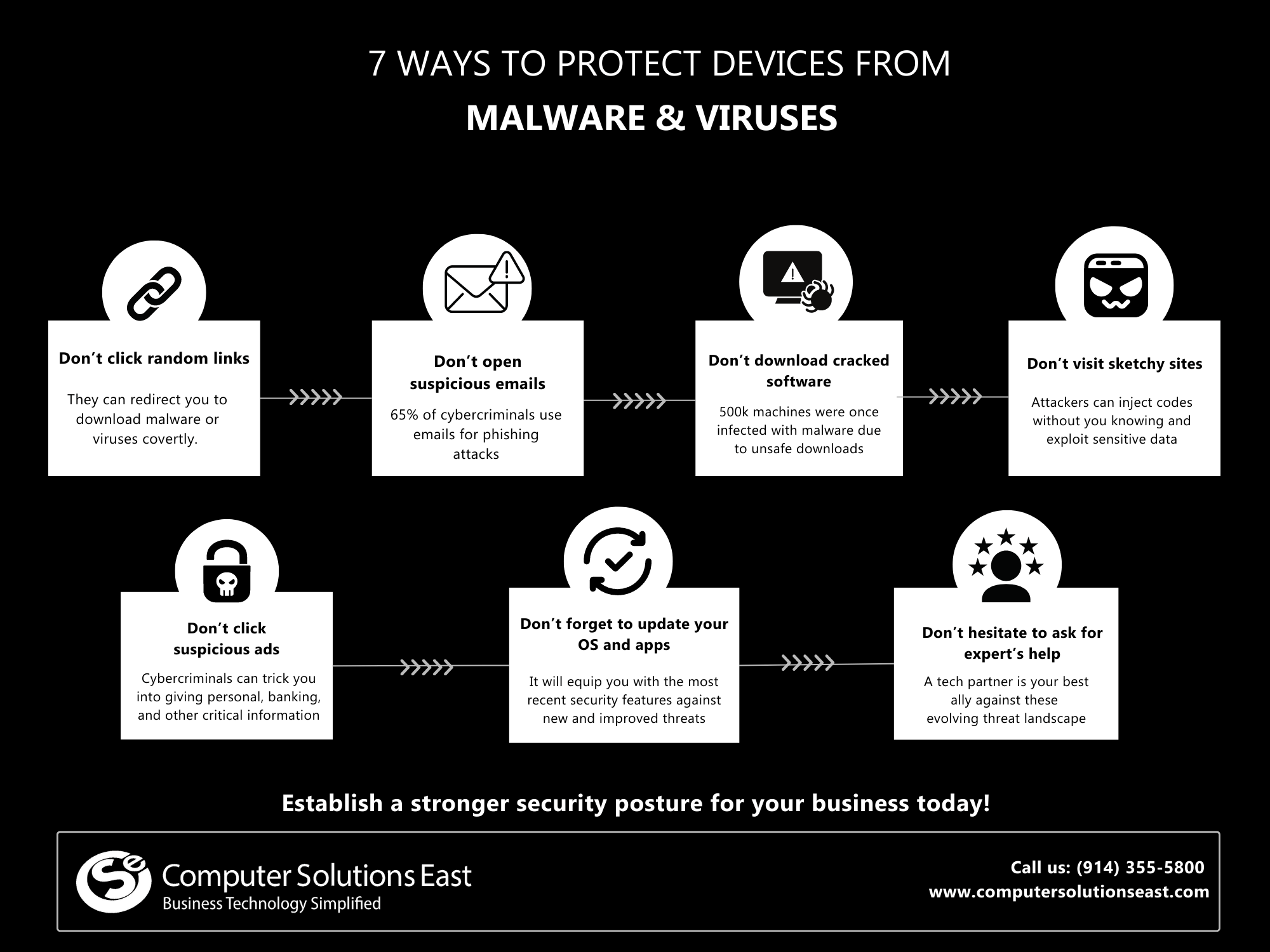
Free software might sound like a great deal—but often, it’s loaded with hidden malware. Cracked or pirated versions of popular apps can bypass your security tools, giving attackers easy access.
Instead of risking your data, invest in licensed productivity software. For example, use official Microsoft 365 Apps for Enterprise or Office 365 Business packages from a trusted provider like CSE to guarantee both functionality and safety.
2. Visiting Infected Websites
Some websites contain malicious scripts that automatically download malware or redirect you to phishing pages. These infections often happen silently, and the fake security prompt may appear minutes later while you’re browsing.
3. Clicking Suspicious Ads or Pop-Ups
Malicious ads are another common tactic. Cybercriminals analyze your browsing habits, then deliver fake ads that look relevant to your interests. Once clicked, they redirect you to harmful sites that trigger the Windows Defender pop-up or inject malware directly into your device.
How to Prevent Windows Defender Security Warning Malware
It’s possible to block these pop-ups—but the real issue goes deeper than one scam. If this phishing trick can infiltrate your system, more advanced attacks can too. That’s why a strong, multi-layered cybersecurity posture is critical for your business.
Here’s how to protect your company from such threats:
1. Stay Cautious Online
Be mindful of what you click, download, or install. Avoid opening links or attachments from unknown sources. Always verify the authenticity of emails and websites before interacting with them.
2. Keep Systems Updated
Regular updates ensure that your devices and security apps can defend against the latest threats. Cybercriminals thrive on outdated software.
3. Strengthen Your Network Defenses
Partnering with a trusted IT provider like Computer Solutions East gives your business the edge. CSE offers comprehensive protection through:
-
Security Baseline Implementation – Builds stronger cybersecurity and compliance foundations, with features like multi-factor authentication (MFA) and Advanced Threat Protection (ATP) for proactive defense.
-
Productivity Tool Protection – Secures collaboration platforms like Microsoft 365 using machine learning to detect abnormal user activity and prevent data leaks.
-
End-User Protection – Monitors device behavior and applies automated security measures to block threats before they spread.
The Bottom Line
The Windows Defender Security Warning scam may look legitimate, but it’s nothing more than a hoax designed to steal your information. Unfortunately, it’s just one of many schemes targeting modern businesses.
To protect your data, devices, and reputation, you need a secure, well-managed IT environment—one that combines technology, compliance, and human vigilance.
At Computer Solutions East (CSE), we specialize in helping businesses build this kind of protection. From Microsoft 365 Security Baselines to managed threat detection and recovery, our experts ensure your organization stays ahead of evolving cyber risks.
Don’t wait for a fake alert to become a real crisis.
👉 Talk to CSE today—and safeguard your business against the next threat.