Microsoft Copilot for Law, Accounting & IT: Real Prompting for Improved Efficiency
AI That Works Like a Colleague, Not a Robot
Let’s be honest, your team is busy.
You don’t have time for “new tools” that take months to learn. You just want the software you already use to do more, faster.
That’s where Microsoft Copilot fits in. It doesn’t reinvent your workflow, it amplifies it.
Copilot quietly lives inside Word, Excel, Outlook, and Teams, helping you write, analyze, summarize, and communicate without ever leaving the app. You’ve heard about AI, but integrated in your daily tools? a good Copilot prompt can do it.
Copilot is just an assistant that:
- Writes client emails for you.
- Finds mistakes in spreadsheets.
- Summarizes meetings and action items.
- Handles repetitive IT requests in seconds.
And because it’s built inside Microsoft 365, your data stays right where it belongs, private, secure, and compliant.
At Computer Solutions East, we help small and mid-sized businesses set up and use Copilot safely, with no data leaks and zero tech headaches.
Here’s how real U.S. teams are already using it.
Law Firms: Stop Writing NDAs at 9 PM
Before
Endless contract revisions. Dozens of emails to track. Deadlines slipping because you’re buried in admin work.
After:
You simply say:
“Turn my notes from last week’s client call into a clean NDA using our firm’s template.”
And in seconds — done.
Or:
“Summarize all emails about the Rivera case.”
Copilot gathers every key point, date, and open task instantly.
Real Result:
A small firm in Maine saved 12 hours a month after adding Copilot to Word and Outlook. That extra time went straight to client calls, and referrals increased within a quarter.
Accounting Firms: Catch Mistakes Before Clients Do
Before
You’re up late, staring at Excel sheets, double-checking numbers, and hoping you didn’t miss anything.
After
You say:
“Show me all transactions over $1,000 with no description.”
And Copilot finds them.
Or:
“Compare marketing spend to sales by region this quarter.”
And Copilot builds a chart, instantly.
Then you finish with:
“Write a professional email to Client X explaining their expense variance.”
And it drafts it for you, in your tone, ready to send.
Real Result:
A CPA firm in Ohio cut its month-end close from 10 days to 5, achieved zero audit findings, and gained new retainer clients thanks to faster turnaround times.
IT Teams: Stop Being the “Help Desk” 24/7
Before:
You’re the go-to for everything: passwords, printer errors, slow PCs, failed updates, the list never ends.
After
You say:
“Show me today’s top help desk issues.”
Copilot replies with a breakdown, urgent tickets, recurring issues, and suggested fixes.
Then:
“Why does this laptop keep failing updates?”
Copilot finds the patch and tells you exactly what to do.
Real Result:
An IT admin at a 12-person law firm reduced his weekly ticket load from 60 to 20.
Copilot auto-solved the rest, freeing him up to secure the network, move users to the cloud, and actually sleep on weekends.
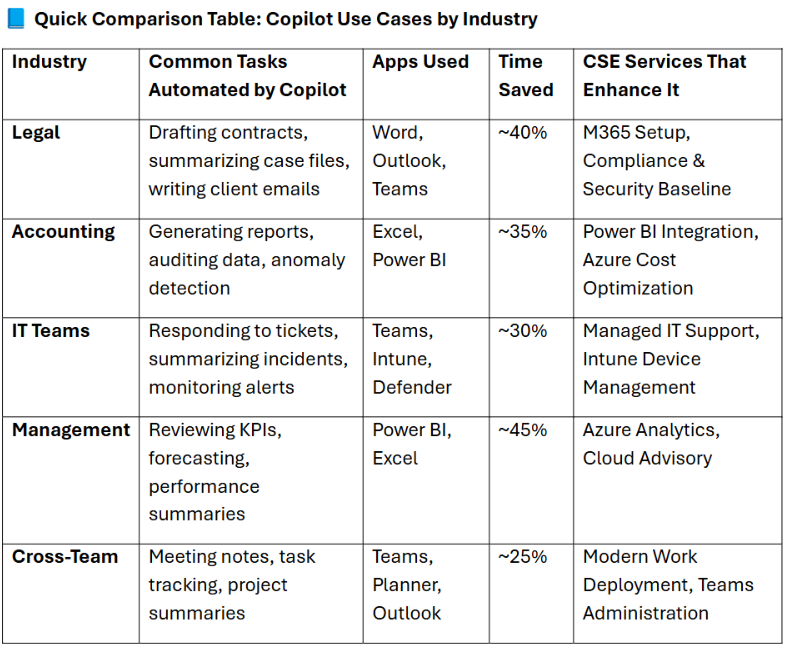
Why SMBs Are Adopting Copilot Now
- Save 10–20 hours a month across your team.
- Use it in the tools you already know, no new software.
- Keep your data private and secure within Microsoft 365.
- Scale your productivity without scaling your payroll.
Copilot isn’t hype, it’s the fastest way to turn everyday tools into smart business assets.
How CSE Helps You Get There
We help small and mid-sized businesses bring Copilot to life, securely and effectively.
Our Copilot Implementation Services (CSE-SRV-114) include:
- Secure configuration and compliance alignment.
- User training in plain, practical language.
- Integration with your existing Microsoft 365 environment.
CSE is a Microsoft Solution Partner in:
Security, Modern Work, Azure Infrastructure, Data & AI, and Digital & App Innovation.
That means we don’t just install tools, we align them with your business goals.
FAQs: Copilot for Small Business Teams
Do I need to install anything?
No. Copilot works inside Word, Excel, Outlook, and Teams, apps you already use.
Is it safe for client data?
Yes. Copilot only accesses what you can see. It doesn’t share, store, or train on your data.
Does it really save time?
Absolutely. Real users report saving 10–20 hours monthly through automation and task summaries.
What if I don’t have an IT team?
We’ve got you. CSE sets it up securely, trains your staff, and supports everything afterward.