From AI Assistance to AI Assistants: How Microsoft Copilot Is Changing Business Operations in 2026
Over the past year, Microsoft Copilot has quickly become part of everyday work.
Businesses are using it to draft emails, summarize meetings, and assist with small day-to-day tasks. For many organizations, this has already created noticeable improvements in productivity and efficiency.
But in 2026, something bigger is happening.
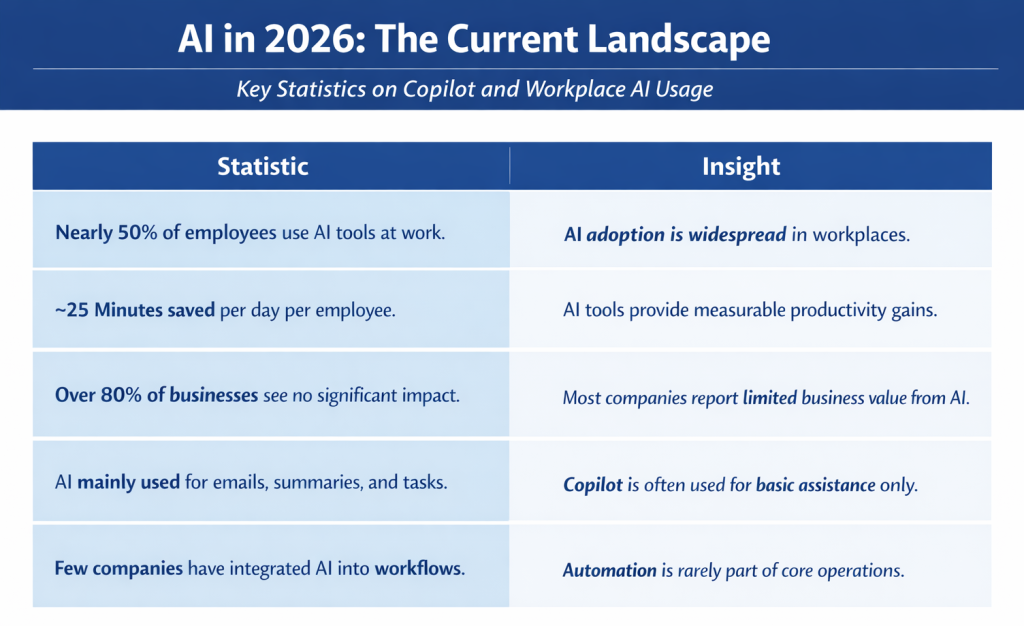
Nearly 50% of employees are already using AI tools in their daily work, yet most businesses still struggle to translate that usage into meaningful operational impact.
The reason is simple.
Copilot is still being used as a tool when it’s capable of becoming something much more.
This is where the shift begins.
What AI Assistance Looks Like in Today’s Businesses
The first phase of AI adoption has focused on improving individual productivity.
Tools like Microsoft Copilot have been introduced as assistants that help users work faster by generating content, summarizing conversations, and reducing time spent on repetitive communication.
These capabilities are already delivering measurable value. Many organizations report saving 20 to 30 minutes per day per employee, which quickly compounds across teams.
However, this level of impact has a limit.
At this stage, AI enhances existing workflows but does not fundamentally change them. Employees still receive requests, interpret information, and manually move tasks forward.
For most businesses, this is where AI adoption currently stands.
The Shift from AI Assistance to AI Assistants
What’s changing in 2026 is not the presence of AI, but its role within the business.
Instead of simply responding to prompts, AI systems are beginning to take action within workflows. This evolution, often described as agentic AI, represents a shift from support to participation.
In practical terms, it means that AI is no longer just helping your team complete tasks.
It is beginning to execute parts of those tasks independently.
With Microsoft Copilot, combined with tools like Power Automate and Copilot Studio, businesses can now build processes where AI interprets information, makes decisions based on rules, and initiates the next step in a workflow.
This transforms AI from a productivity tool into an operational component of the business.
What AI-Driven Workflows Look Like in Practice
To understand the impact of this shift, consider a common business scenario.
A request comes into a shared inbox. Someone reads the message, determines what needs to be done, forwards it to the appropriate person, and follows up when necessary.
Even in efficient organizations, this introduces delays and inconsistencies.
Now compare that to a Copilot-enabled workflow.
An incoming request can be automatically analyzed. Copilot can summarize the content, identify intent, and categorize the request. From there, it can trigger a workflow that routes the task, logs the activity, and prepares a response.
By the time an employee interacts with the request, much of the work has already been completed.
This is the difference between AI assisting tasks and AI participating in workflows.
Thinking about how AI could fit into your workflows? A structured approach helps identify where automation can create the most impact before making changes.
Why Most Businesses Are Stuck in “Assistance Mode”
Despite having access to these capabilities, most organizations are not operating this way.
The challenge is not the technology, it’s the implementation.
In many environments, systems are not fully connected. Email, file storage, communication tools, and business applications operate independently, making automation difficult to achieve.
There is also a lack of structured workflow design. Businesses adopt AI tools without clearly defining how processes should move across teams and systems.
As a result, Copilot remains limited to individual productivity instead of becoming part of the organization’s operational framework.
Security and governance also play a role. As AI begins interacting with sensitive data and internal systems, businesses must ensure proper access controls, monitoring, and compliance. Without that structure, expansion of AI usage is often delayed.
This combination of factors keeps many organizations in “assistance mode,” where AI improves efficiency but does not transform operations.
How Microsoft Copilot Enables AI-Driven Workflows
Microsoft Copilot plays a central role in this transition due to its deep integration across the Microsoft ecosystem. Instead of operating as a standalone tool, it works across the platforms businesses already use every day, enabling automation and workflow execution at scale.
With the right configuration, Copilot can support AI-driven workflows by:
- Interacting with emails, documents, and meetings within Microsoft 365 to understand context and intent
- Connecting to tools like SharePoint, OneDrive, and Teams to access and process business data
- Integrating with Power Automate to trigger workflows based on incoming requests or system events
- Leveraging Copilot Studio to build custom AI agents tailored to specific business processes
- Supporting cross-platform automation by linking multiple systems into a single workflow
Together, these capabilities allow businesses to move beyond isolated tasks and begin building workflows where AI can actively participate in day-to-day operations.
Security and Governance in AI-Powered Environments
As AI becomes more involved in business operations, security and governance become increasingly important.
Copilot interacts with a wide range of data sources, including emails, documents, and internal systems. Ensuring that this access is properly controlled is critical to maintaining data integrity and compliance.
Organizations must implement identity management, access policies, and monitoring mechanisms to ensure that AI operates within defined parameters. This includes enforcing authentication requirements, managing permissions, and maintaining visibility into system activity.
Microsoft provides the tools necessary to establish this framework, but they must be configured and managed appropriately. Without a structured approach, the introduction of AI-driven workflows can introduce risk rather than reduce it.
How CSE Helps Businesses Move Beyond AI Assistance
Transitioning from AI assistance to AI assistants requires more than enabling a feature—it requires a coordinated strategy.
Computer Solutions East works with organizations to identify where AI can create meaningful operational improvements. This involves analyzing existing workflows, connecting systems, and designing processes that leverage Copilot capabilities effectively.
CSE supports the implementation of these solutions within the Microsoft environment, ensuring that workflows are not only functional but also secure and scalable. By integrating automation with security and governance, businesses can expand their use of AI with confidence.
Frequently Asked Questions
What is the difference between AI assistance and AI assistants?
AI assistance focuses on helping users complete tasks, such as writing emails or summarizing information. AI assistants, on the other hand, can take action within workflows, analyzing information, triggering processes, and helping move work forward automatically.
How can Microsoft Copilot be used beyond writing emails?
Beyond content generation, Copilot can be integrated into business workflows to analyze requests, categorize information, and trigger automated actions using tools like Power Automate and Copilot Studio.
What are AI-driven workflows in a business environment?
AI-driven workflows are processes where AI helps manage tasks from start to finish. This can include interpreting incoming requests, routing tasks, generating responses, and supporting decision-making without requiring constant manual input.
Is Copilot enough to fully automate business processes?
Copilot provides a strong foundation, but full automation typically requires integration with other Microsoft tools, workflow design, and proper configuration to align with business operations.
Share This Post

No Office? NO Problem!