
What Is Microsoft 365 Security Baseline and Why Does Your Business Need One in 2026?
Cybersecurity has become a business issue, not just an IT issue. From ransomware attacks and phishing scams to cyber insurance …

Seamlessly integrate Microsoft 365 Copilot with CSE’s expert consulting and transform your business with ease.





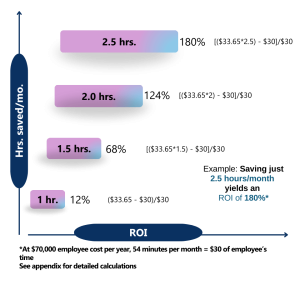
Microsoft 365 Copilot isn’t just a new AI tool like the others, it’s more like having an autonomous assistant that helps you and your business work faster, better and more productively. It changes the way teamwork is done and transforms.
Copilot starts by understanding the reality of what your organization needs are, in this sense, it shows how much growth potential you can have and where is possible to grow. So, it can help
with more proactive and realistic decisions.
You can use Copilot to know how much productivity and effectiveness there is on your team by learning exactly everyone’s roles and tasks they handle, in this way, Copilot can show you a way to make things easier and more efficient for everyone by adding new tools that will sync smoothly with the whole operation.
On the other hand, you can work with experts in planning sessions to create ideal setups for your business and its operation. Copilot will just help you and your team reach your goals, growing the business, being more flexible and even offering a better experience for the customer
With the help of CSE, we’ll set things up the right way, avoiding common mistakes and saving you a lot of time. Copilot shines by automating repetitive tasks every day, meaning less time spent on repetitive tasks and focusing more on what really matters.
Copilot also provides insights based on your company’s database, making easier-to-make smarter choices based on previous patterns and forecast for new projects. Whether you’re launching a new strategy or product, it keeps projects moving by making planning and analysis quicker and easier.
Staying on top of the organization is easier too. Copilot summarizes meetings, creating key points, real time transcripts and highlighting follow-up tasks so nothing goes missing. Best of all, it boosts performance by enhancing daily operations and freeing up resources and time to focus on growth.

Copilot identifies areas of productivity improvement within your organization while also helping you develop adoption strategies and detailed implementation on new protocols.

Offers a structural approach to implementing Copilot tools on your organization. This includes user training, systematic implementation, 24/7 assistance, smooth and efficient deployment.

Create a detailed and easy-to-follow plan which enables strategic markers to deploy Copilot features with effective integration and boosted productivity. This service includes developing frameworks, roadmaps and improving features alongside continuous support.

Protects your organization data with top-of-the-line security measures that are compliant with today’s legal standards in the US. Microsoft 365 for Business ensures that your information stays secure through features that establish privacy and threat detection capabilities.

Specific and targeted training is designed for specific roles enabling the organization to utilize all of Copilot’s functions.

Custom setup, tweaks, and integration for optimal performance.

Tracks Copilot’s development over the organization by showing insights, analytics and reports.
Our cloud solutions help the global enterprise achieve business goals.

We work to identify the clients IT problem and offer the best solution. Time and again,we face a situation that demands agility and the right set of talent that can solve technology issues.
Learn More
Not all projects are about innovation. Some are those that add a feather in our cap no matter what we deliver and how. It was typically a government project that involved a lot of roadblocks right.
Learn More
Being an expert IT solutions partner in the US and worldwide, we are committed to delivering results that drive business growth. Our team recently worked with Neil Hoosier & Associates to resolve.
Learn MoreThe AI-powered Microsoft Copilot provides users with an assistant that operates within Microsoft 365 tools, including Word, Excel, PowerPoint, Outlook, and Teams applications. The system accelerates workplace performance by automating repetitive tasks and providing smart suggestions.
Copilot’s AI-driven chat features enhance communication within your team by summarizing meetings, keeping track of discussions, and ensuring that everyone remains connected and informed.
Copilot merges natural language understanding with AI to streamline tasks, create content, and deliver real-time insights, boosting productivity and improving decision-making.
Microsoft Copilot helps with daily tasks while generating drafts and innovative concepts. This allows your team to work on essential operations while achieving enhanced productivity.
You need specific licenses to use Microsoft Copilot. Contact us to explore the most suitable licensing options for your organization.
Our Microsoft 365 Copilot Technical Readiness Assessment evaluates whether your infrastructure, security policies and workflows are set up for successful implementation. CSE’s experts will assist you at every stage, guaranteeing a smooth transition.
The timeline for implementation varies based on factors such as the business size, current infrastructure, and the level of customization required. CSE’s Microsoft Copilot service providers are dedicated to ensuring that Copilot is operating swiftly and with minimal disruptions.
We implement Copilot workforce planning by evaluating your organization’s preparedness, pinpointing essential user personas, deploying and setting up Copilot, and offering thorough training and continuous support.
You’ll find Copilot in most of the core Microsoft apps Word, Excel, Outlook, PowerPoint, and Teams. It shows up while you’re working and offers help based on what you’re doing. In Word, it might help with phrasing or tone. In Excel, it can help explain complex data. In Teams, it might sum up key meeting points for you. It’s there to support, not replace, the way you work.
Yes, Copilot runs entirely within your Microsoft 365 environment. It doesn’t pull data from outside your organization or use your documents to train the AI behind the scenes. Microsoft has put strict safeguards in place, so your data stays where it belongs. If your company already meets compliance standards like HIPAA or GDPR, Copilot fits right into that framework.
Definitely. If you work with Excel a lot, Copilot can save you time by suggesting formulas, explaining what a dataset means, or even helping build out charts. In Outlook, it’s great for catching up on long email threads or drafting a quick, clean reply. It’s not just a time-saver it also helps reduce mistakes and missed details.
Small and medium-sized businesses can absolutely use Copilot. As long as the licensing requirements are met, Copilot can bring the same productivity benefits to smaller teams as it does to larger ones. At CSE, we’ve helped many SMBs get started, and we make sure deployment is smooth and scaled to fit the size and pace of your team.
The easiest way is to get in touch with us. We’ll help you figure out if your Microsoft 365 setup is ready, advise on the right licensing, and guide you through the deployment process. From setup to user training, CSE is here to support your rollout every step of the way so you can start seeing results quickly.
Microsoft 365 Copilot for Service functions via AI to provide real-time process automation that improves customer support. The service teams achieve productivity gains while optimizing work processes to deliver better, more rapid customer support, which increases operational effectiveness and customer loyalty.
Copilot is designed on Microsoft’s strong security framework, which keeps your data safe. It features Entra ID for enhanced security, and your chat data is not stored or utilized for model training.
CSE provide a variety of services such as Deployment & Readiness, Advanced Threat Protection, Workflow Automation, Security Configuration and Data Governance, Training & Upskilling, Advanced Analytics, and Customization Services.
Absolutely! Copilot is fully integrated into the Microsoft 365 apps you use daily, providing a smooth and familiar user experience.
Our team of experts offers complete support, starting from the initial setup and continuing with ongoing assistance. We ensure a smooth experience and help you maximize the benefits of Microsoft Copilot.
Microsoft 365 Copilot for Business seeks to enhance workplace efficiency, particularly within healthcare and finance industries, retail establishments, and manufacturing operations. CSE’s customized implementation services guarantee the proper adaptation of Copilot to fulfil the specific needs of each industry.
With Microsoft 365 Copilot Advanced Analytics Services, you can create automated reports, obtain valuable insights, and monitor performance metrics. CSE assists businesses in utilizing these analytics to make informed, data-driven decisions.
Microsoft 365 Copilot is an AI assistant that works directly inside tools like Word, Excel, Outlook, and Teams. Instead of learning something new, your team continues using the apps they already know but with extra help behind the scenes. Whether you’re writing a report or digging into a spreadsheet, Copilot helps move things along by offering smart suggestions and shortcuts.
Time adds up writing, sorting through email threads, keeping track of meeting notes it can take over your day. Copilot helps cut down the manual effort so people can focus on bigger priorities. For teams like finance or HR that deal with loads of data or documentation, it can make a big difference in keeping work
Copilot is offered as an add-on to Microsoft 365 and currently costs between $30 and $50 per user, each month depending on your plan and setup. If you’re unsure about your licensing, we at CSE can walk you through what’s needed and help you get started with the right configuration.
Copilot works within your existing Microsoft 365 permissions. That means it only accesses the information users already have access to no overreach. It doesn’t store your data outside of your tenant, and none of it is shared or used to improve Microsoft’s broader AI models. The goal is to give you assistance, not risk your privacy.
Yes. Some companies choose to integrate Copilot with systems like Dynamics 365 or a CRM. You can also build custom plugins if your team has more specific workflows or tools. It’s flexible enough to support general use out-of-the-box, but also powerful enough to grow with you if you want more tailored automation.
Cybersecurity has become a business issue, not just an IT issue. From ransomware attacks and phishing scams to cyber insurance …

Over the past few years, businesses transformed how employees communicate and collaborate faster than almost anyone expected. Organizations rapidly adopted …
Continue reading “Businesses Modernized Communication Faster Than Security”

For years, businesses focused heavily on protecting physical infrastructure. Servers sat inside office buildings. Files lived on local drives. Employees …
Continue reading “The Modern Workplace Runs on Cloud Data, What Happens If It Disappears?”
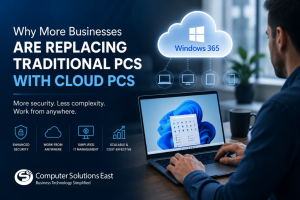
For years, businesses have relied on the same IT model: Buy laptops.Manage devices.Patch systems.Replace aging hardware.Repeat the process every few …
Continue reading “Why More Businesses Are Replacing Traditional PCs with Cloud PCs”